


How I use AI
Your first step with AI doesn't have to be a leap.
I've handed most of the repetitive part of my week to AI: invoice follow-ups, proofreading in two languages, the logistics of the events I run. You don't need a big project or a new vocabulary to start. You need one annoying task, and someone to build the first version with you.
An integrator-architect. Most people use AI as a tool that answers questions. I use it as the layer that orchestrates my practice: my tools, my information and my routines, working as one.
My approach
AI works best when it starts with a real, everyday problem, not with the technology. Here's how I keep it simple.

Start with one task
The repetitive, slightly boring one that eats your week. Not a big project.

Try it on your real work
A small working version with your own information, so you see it help before deciding anything.

You stay in control
It suggests, you decide. Nothing goes out without you, and your information stays yours.

Keep what works
Cheap to try, cheap to drop. When something works, we add the next task.
The offer
First Step with AI
A workshop and one small working version, built with your own information. Then you decide.
Workshop
We look at your week together and pick one task worth handing off.
First version
I build a small working version with your real information. You see it work.
Your call
Keep it, grow it, or drop it. No long commitment.
Leading a team? We can run the workshop with your people, so they keep going after I leave.
Three projects
Two are my own. The third is client work, shown with every detail changed: client work stays confidential.
Project 1 · Becoming a product
Event software born from a real conference
I ran Intersection 26 with a handful of small tools that all shared the same information. It worked well enough that I'm turning it into software for people who organize events of 50 to 1,000 participants.
Ticketing tools sell tickets. Mine shares out the work: a plan that counts back from the event date, a simple space where each speaker, volunteer and partner sees only their own tasks, and ticketing, sponsorship, budget and the big day in one place. It works without AI; AI stays an option.
- Designed and mocked up
- Pilot events planned for 2027
- French and English, Québec first
- Organizers keep their own data
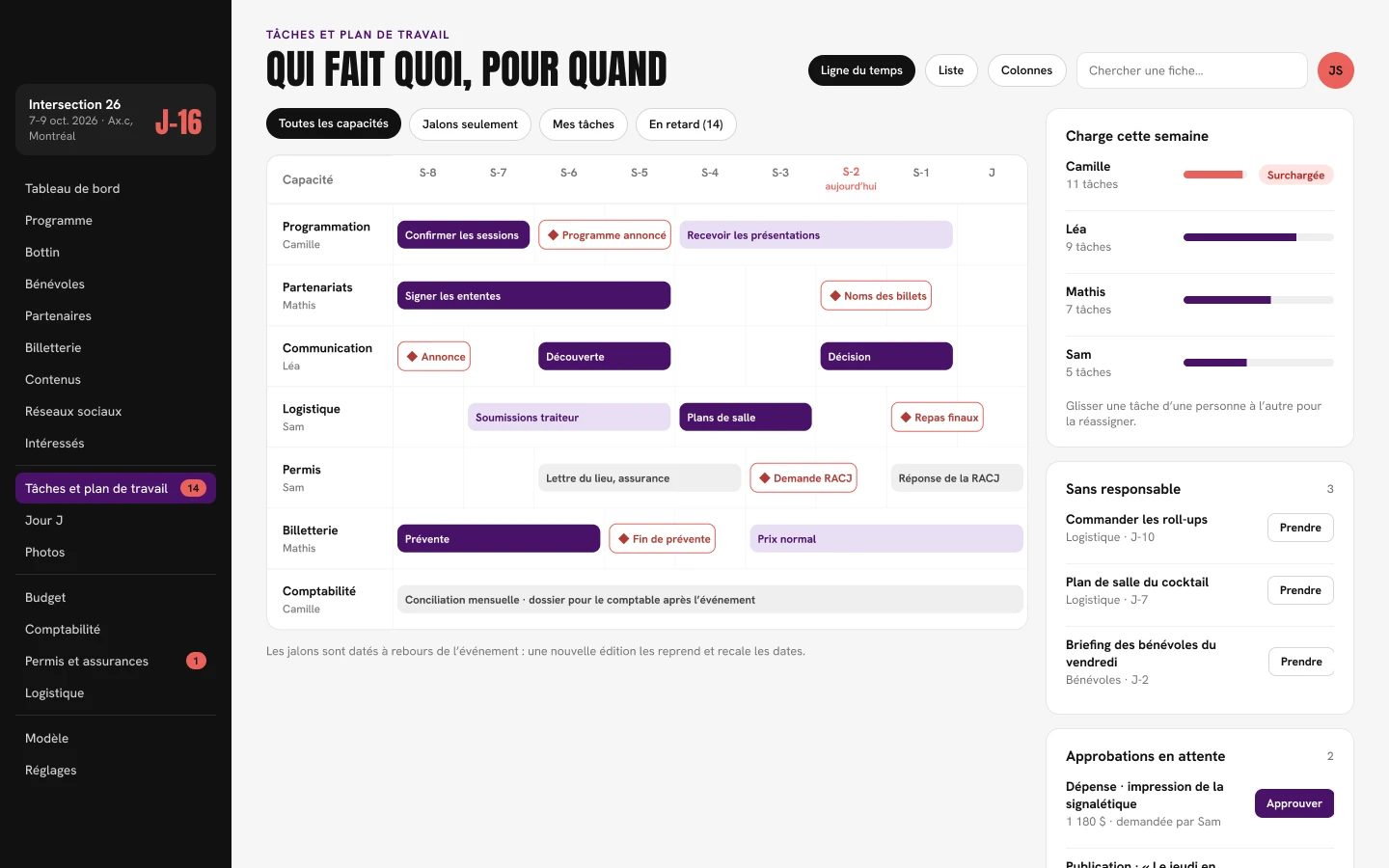
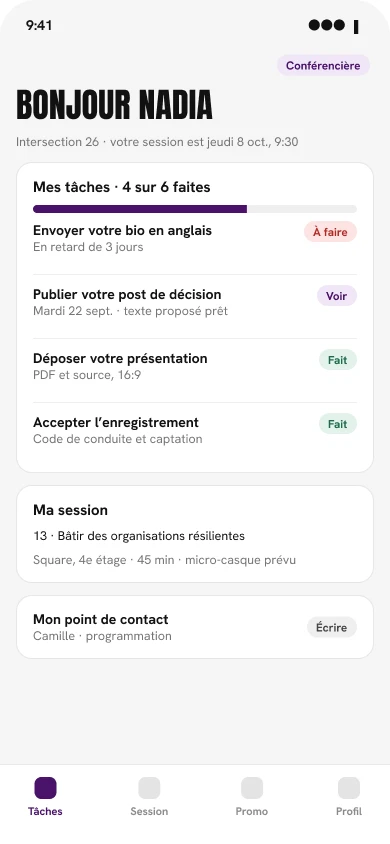
Early mockups, in French. The names are examples.
Project 2
Nine AI helpers for my week
Each helper has one job and a little pixel face, and they all live on one dashboard styled like a Game Boy Color. The face tells me what needs attention: the accountant looks worried when an invoice is late, the hockey fan sleeps on days without a game. They suggest, I decide. Nothing goes out without me.
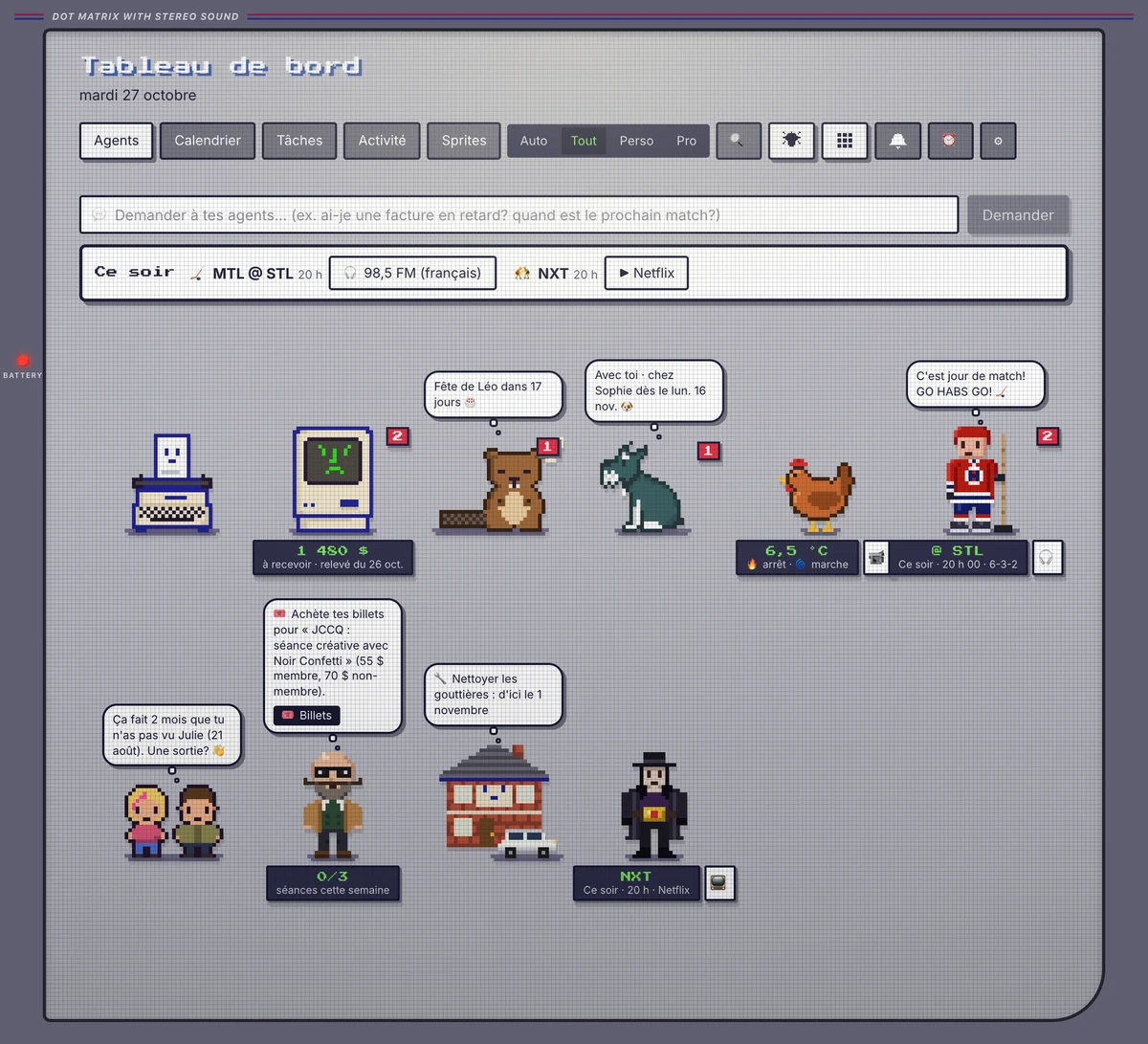
Why a Game Boy?
On purpose. A new habit sticks when it feels familiar and a little fun. Nostalgia lowers the guard: I open it out of curiosity, not duty, and that's how a new way of working settles in.
I bring the same idea to clients. Your first AI tool should feel friendly, not intimidating.
Names and amounts changed.

Correcteur
Proofreader & translator
Corrects and translates my French and English texts, in my own style.

Comptable
Accountant
Keeps an eye on my books, spots late invoices and prepares the reminders I send myself.

Famille
Family
Birthdays a month ahead, and weekend ideas based on the forecast.

Amis
Friends
Nudges me when I haven't seen a friend in six weeks.

Mousteille
My dog
Knows which weeks he's with me, and preps his bag list the day before he changes homes.

Poules
My hens
Watches the coop at night and only alerts me when a camera sees an animal.

Coach
Health coach
Fits my workouts into the free spots in my week, around the weather.

Fan du CH
Habs fan
Game days, the live score, and a summary before puck drop.

Maison
The house
Gutters, winter tires, furnace filter: seasonal chores that come back on their own.
- 9 helpers
- 2 days from the first idea to my phone
- 0 emails sent without me
Project 3 · Client work, anonymized
See a whole company in days, then fix problems where they start
For a recent client, I built a shared workspace that maps the whole company: what it stands for, what it offers, who it serves and how it really runs. With AI's help, hundreds of notes and documents were sorted into that map within days. The decisions stayed with the people.
Once everything sits on one page, the knots show up fast. Instead of patching each symptom, you fix the one decision that causes them.
What you get is a digital twin of the company: a living copy you can explore, question and test ideas on before touching the real thing. AI makes it easy to pile up information. The hard part is reading it. That's where EDGY comes in: a shared visual language for enterprise design that sorts the mountain of data by what matters (who you are, what you offer, how you run) so the important links stand out and the noise falls away. More on enterprise design and EDGY.
- 1 See the whole company on one page
- 2 Spot where things clash
- 3 Fix the cause, not the symptoms
Illustrative example: my own firm, with made-up data. The real client and its information stay confidential.
Let's find your first task.
Book 30 minutes. Bring the task that annoys you most, and I'll show you what a first step would look like for you.
Book a call